IT Help Desk & GxP Service Desk
Overview (/helpdesk)
The IT Help Desk module delivers service management designed specifically for regulated environments. Standard ITIL workflows cannot be applied uniformly to regulated systems because an unauthorized configuration change or account override on a validated system violates 21 CFR Part 11 and EU Annex 11.
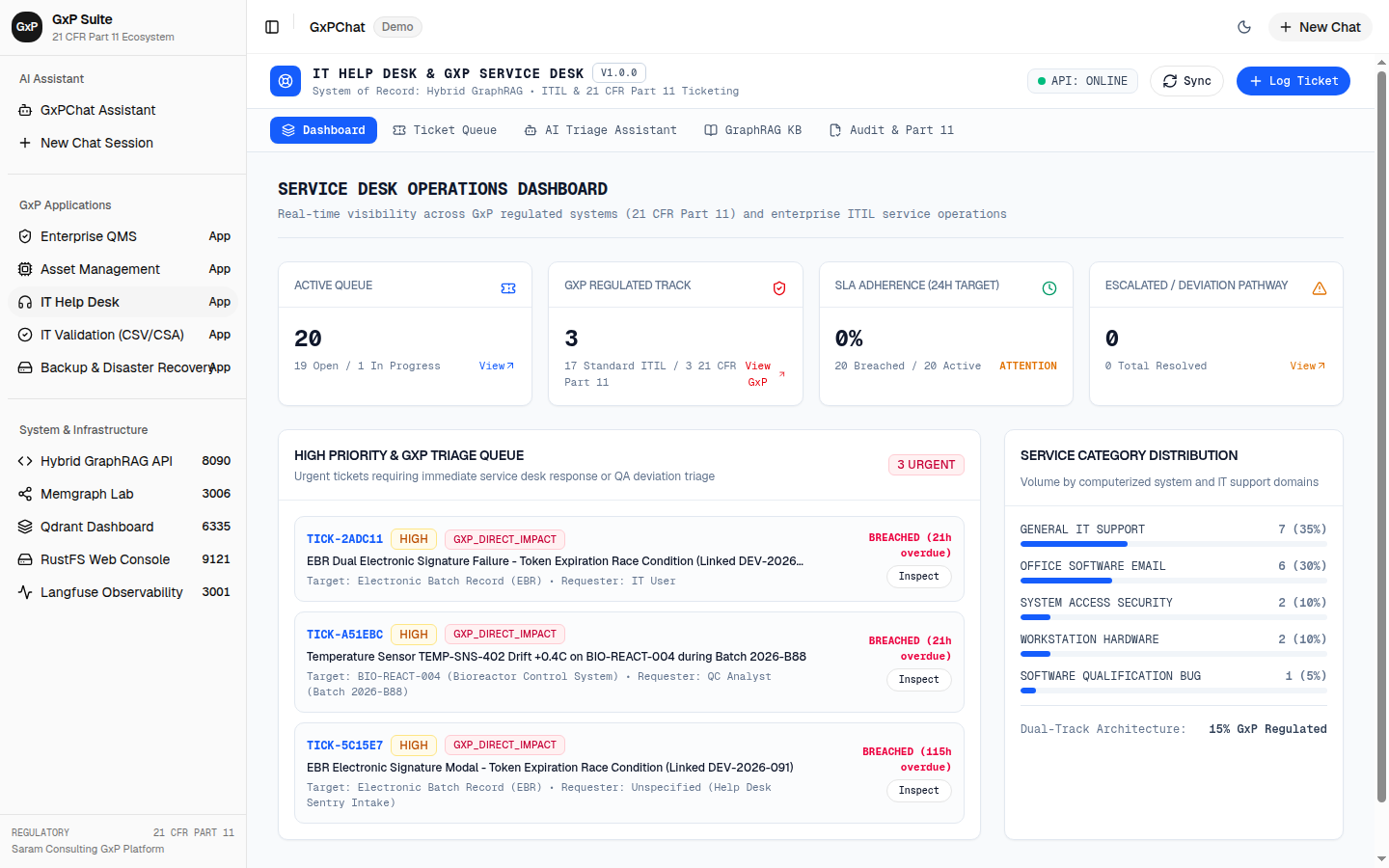
Dual-Track Ticketing System
The service desk implements automated dual-track triage:
1. Standard Enterprise ITIL Track (Non-GxP)
- Common office hardware issues, printer jams, general network inquiries, and non-regulated desktop software.
- Standard SLA tracking without regulatory audit trail overhead.
2. Regulated GxP Incident Track (21 CFR Part 11)
- Direct impact on computerized systems (LIMS, CDS, EBR, MES, QMS).
- Strict change restrictions: password lockouts, audit trail anomalies, and software errors on validated workstations cannot be cleared by standard tier-1 help desk agents without QA notification.
- Automated generation of 21 CFR Part 11 audit records upon ticket resolution.
- Dynamic escalation to
ItHelpdeskAgentand automated routing to QA Deviation or Change Control when software anomalies are detected.
Electronic Signature & Part 11 Account Lockout Assistance
A frequent operational challenge in GxP facilities is operator account lockout following repeated invalid electronic signature credential entries:
- Under 21 CFR § 11.10(d) and § 11.300, electronic signature accounts must enforce lockout limits to prevent brute-force attacks.
- The IT Service Desk provides a dedicated “GxP Account Unlock Request” workflow.
- Requires dual identity verification before unlocking accounts with signature authority on manufacturing execution or batch release systems.
- Every unlock action is logged with reasons, administrative approver identity, and cryptographic hash verification.
Service Desk Metrics & Status Ledger
The interface provides:
- Metric cards tracking Total Open Tickets, GxP Direct Impact Tickets, High Severity Incidents, and Average Time to Resolution.
- Filterable ticket data table with status badges (New, In Progress, Escalated to QA, Resolved, Closed).
- Modal dialog for submitting new service requests with real-time AI impact classification.
Operational Use Case Scenario Workflows
The GxP Service Desk prevents unauthorized bypass of computerized system controls by enforcing regulatory triage between ITIL service management and quality deviations.
Scenario 1: 21 CFR Part 11 Electronic Signature Lockout Assistance
sequenceDiagram    autonumber    actor Op as Manufacturing Operator    actor QA as QA Floor Supervisor    participant UI as GxP Service Desk (/helpdesk)    participant Agent as ItHelpdeskAgent    participant AD as Active Directory / IAM    participant Audit as 21 CFR Part 11 Audit Trail
    Op->>UI: Submits emergency unlock ticket (System: EBR, Reason: Invalid PIN x3)    UI->>Agent: Evaluates user authorization and active batch context    Agent->>UI: Requires dual-custody supervisor authorization    QA->>UI: Reviews operator identity & signs approval with credentials    UI->>AD: Issues administrative lockout reset token    UI->>Audit: Writes cryptographic event log with reason and supervisor signature    AD-->>Op: Sends one-time MFA re-authentication challenge
1. Context & Operational Pre-conditions
- System: Electronic Batch Record (
EBR). - Scenario: An operator enters an incorrect password three consecutive times during mandatory in-process weight verification on batch
LOT-2026-B88, triggering security lockout per 21 CFR § 11.10(d). - Urgency: High (batch progress is halted pending operator signature).
2. Service Desk Ticket Submission
- Operator accesses
/helpdeskfrom a nearby cleanroom kiosk and clicksSubmit GxP Support Request. - Selects category
GxP Account Unlock Request. - Inputs System Name
EBRand Employee ID. - The system flags the ticket as
Regulated GxP Incident Track (21 CFR Part 11)with PriorityHigh.
3. Dual Identity Verification & Escalation
- The
ItHelpdeskAgentanalyzes the request:- Recognizes that the account possesses legal batch execution signature authority.
- Blocks standard Tier-1 single-click password reset.
- Prompts for secondary QA supervisor verification per
SOP-IT-005.
- The QA Floor Supervisor logs into the service desk ticket, verifies the operator’s physical badge and identity, and clicks
Authorize Account Unlock. - Supervisor executes a 21 CFR Part 11 electronic signature with reason
I certify the identity of the operator and authorize an administrative lockout reset.
4. Audit Trail & Ticket Resolution
- The backend issues a one-time cryptographic reset token to the operator.
- PostgreSQL logs an immutable record in
audit_trail_events:- Timestamp, operator ID, supervisor ID, system code
EBR, and SHA-256 hash manifest.
- Timestamp, operator ID, supervisor ID, system code
- The ticket status updates to
Resolved, and the manufacturing batch proceeds without compliance delay.
Scenario 2: Software Anomaly Escalation from Helpdesk to QA Deviation
1. Context & Operational Pre-conditions
- Regulated System: Laboratory Information Management System (
LIMS v4.2). - Problem: QC analysts report intermittent timeout errors when approving 96-well plate ELISA potency results.
2. Ticket Submission & Automated Impact Analysis
- QC Analyst submits a ticket:
LIMS v4.2 times out when processing 96-well plate calculation. - The
ItHelpdeskAgentparses the request using hybrid retrieval:- Identifies
LIMSas a direct GxP-regulated software system. - Detects keyword
calculation timeout, indicating a potential risk to data integrity or release record availability under 21 CFR § 11.10(c). - Flags the incident as non-trivial (not a forgotten password or user training issue).
- Identifies
3. Automated Dual-Track Routing & QMS Cross-Link
- The agent automatically creates an IT Deviation in
/qms:- Deviation Number:
DEV-LIMS-TIMEOUT-01 - Initial Severity:
Major - Description:
Intermittent database timeout during ELISA potency calculation batch runs.
- Deviation Number:
- The IT Service Desk ticket status updates to
Escalated to QA. - The ticket UI displays a direct cross-reference link to the QMS deviation record, preventing duplicate investigations and maintaining traceability.
Scenario 3: Non-GxP Standard Hardware Support Ticket
1. Context & Operational Pre-conditions
- Equipment: Administrative office laser printer
PRN-ADMIN-04. - Issue: Paper tray jam and low toner warning.
2. Workflow & Segregation
- An administrative assistant submits a ticket via
/helpdesk. - The AI ticket classifier identifies the asset as
Non-GxP Enterprise Hardware. - System assigns the ticket to Tier-1 IT Support queue.
- Support technician replaces toner and clears jam, marking ticket
Resolved. - System logs the event in standard ITIL operational metrics without generating 21 CFR Part 11 audit records or QA alerts.