Conversational AI Assistant Console
Assistant Interface (/)
The root route of GxPChat delivers an interactive conversational workspace powered by the Vercel AI SDK and the backend FastMCP server. It allows quality managers, CSV engineers, and system administrators to query the hybrid knowledge base and execute multi-agent workflows through natural language.
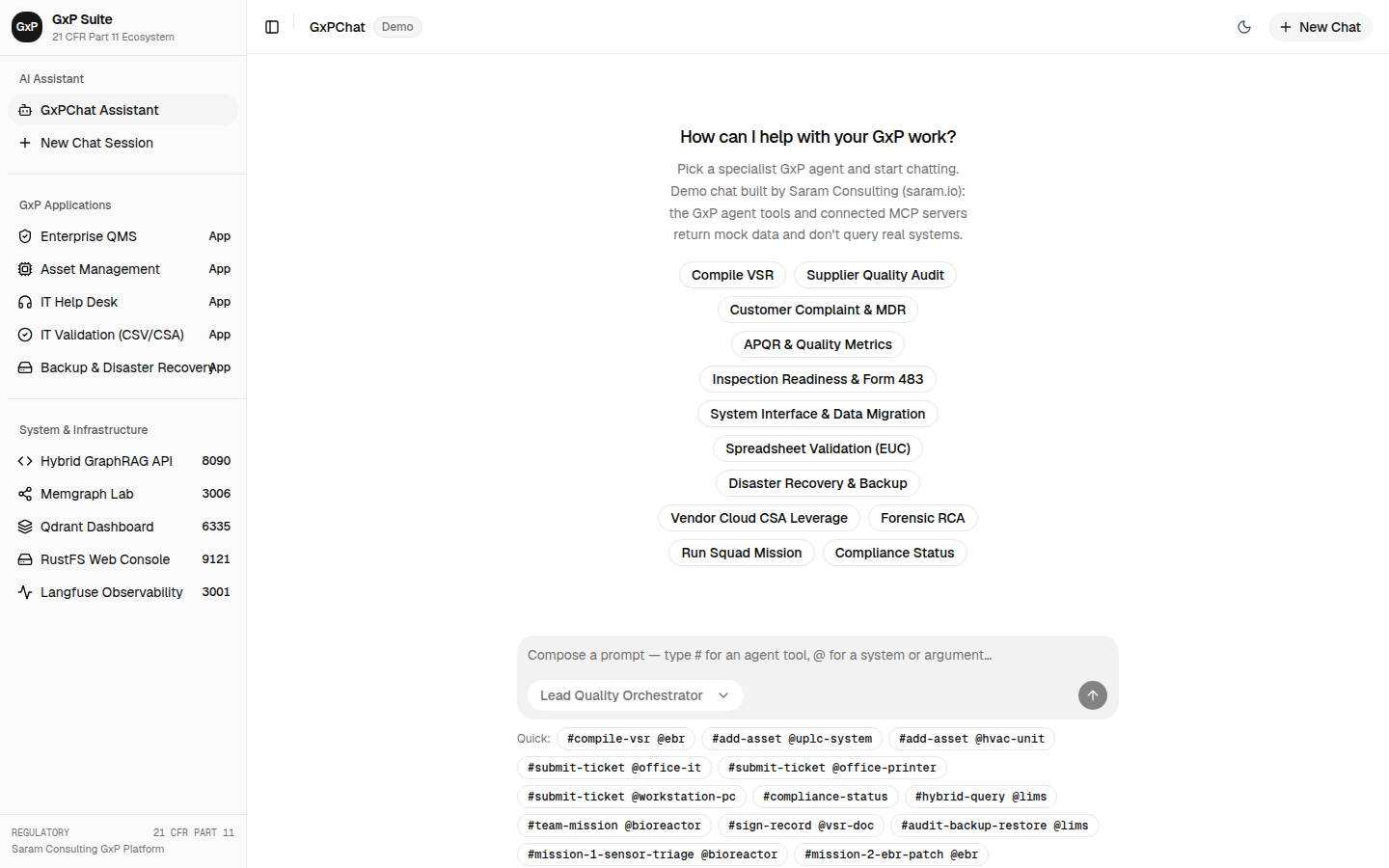
Smart Prompt Composer
The prompt input box features an intelligent autocomplete composer that assists users in structuring regulatory requests:
Action Commands (#)
Typing # opens an interactive dropdown menu of predefined regulatory commands:
#check-validation-status: Audits test protocol execution and RTM coverage for a specified system.#compile-vsr: Triggers the Lead CSV Orchestrator to generate a formal Validation Summary Report.#draft-quality-doc: Opens the document drafting pipeline for SOPs, CAPA plans, or policies.#sop-draft: Generates a standard operating procedure adhering to ISO 9001 and ISO 13485 structure.#capa-plan-doc: Creates a structured CAPA remediation plan following Clause 8.5.2/8.5.3 mandates.#system-risk-assessment: Calculates GAMP 5 software category and CSA Critical Thinking risk priority.#part11-compliance: Evaluates 21 CFR Part 11 and ALCOA+ compliance indicators.#mission-8-backup-restore: Executes the multi-agent disaster recovery qualification squad.#audit-backup-restore: Audits automated snapshot logs and manual Qualified Person executions.
Entity and System Mentions (@)
Typing @ enables autocomplete against regulated computerized systems, assets, and standard operating procedures:
@ebr: Electronic Batch Record system@cds: Chromatography Data System (Empower)@lims: Laboratory Information Management System@mes: Manufacturing Execution System (DeltaV)@bioreactor: Custom Bioreactor Controller skid@sop-it-018: Automated Cloud Backup and Continuous WAL Streaming SOP@sop-it-019: Standalone Analytical Instrument Qualified Person Dual-Custody Backup SOP@eq-hplc-001: Waters Alliance HPLC Analytical Instrument
Streaming Tool Part Lifecycle
When an agent executes an operation, the assistant renders dynamic tool state cards:
- Tool Invocation (
calling): Indicates the active agent or tool being invoked (for example,query_hybrid_knowledge_baseorask_gxp_agent) with an active progress indicator. - Tool Execution (
called): Displays the parsed arguments passed to the backend tool. - Tool Output (
output): Renders the structured response, complete with:- EvidenceGate verification badges (confirming whether retrieved chunks passed live PostgreSQL hash checks).
- Traceability links to cited requirements, SOPs, or deviations.
- Interactive questionnaire cards (
ask_user) for human-in-the-loop decisions.
Model Selection & Context Switching
The top header of the AI Assistant console allows users to switch between inference models at runtime:
- Local Ollama Models: For zero-data-leakage on-premises deployments.
- DeepSeek V4 Flash: High-speed reasoning with deterministic temperature locks.
- OpenAI GPT-4o: Alternative cloud model for complex multi-modal evaluation.
Operational Use Case Scenario Workflows
The Conversational AI Assistant Console supports cross-disciplinary workflows spanning validation engineering, quality assurance, system administration, and audit readiness.
Scenario 1: Automated Validation Summary Report Compilation (#compile-vsr @ebr)
sequenceDiagram    autonumber    actor CSV as CSV Validation Lead    participant UI as AI Assistant Console    participant Orch as LeadCsvOrchestrator    participant Squad as Traceability, Risk & Testing Agents    participant Gate as EvidenceGate    participant DB as PostgreSQL / Memgraph / Qdrant    participant Sign as 21 CFR Part 11 Digital Signatures
    CSV->>UI: Types "#compile-vsr @ebr" into Smart Prompt Composer    UI->>Orch: Dispatches orchestration request (system_code="EBR")    Orch->>Squad: Parallel dispatch to specialized sub-agents    Squad->>DB: Query requirements, risk files, and test logs    DB-->>Squad: Raw data chunks and graph topologies    Squad->>Gate: Submit evidence chunks for verification    Gate-->>Squad: Validated chunks with active hash certifications    Squad-->>Orch: Return structured Pydantic response payloads    Orch->>UI: Stream multi-part VSR draft with interactive review card    CSV->>Sign: Review document sections and execute digital signature    Sign->>DB: Write signed VSR with SHA-256 manifest to audit trail    UI-->>CSV: Display confirmation and regulatory certificate
1. Context & Operational Pre-conditions
- System Under Evaluation: Electronic Batch Record System (
EBR). - Target Lifecycle Milestone: Pre-release validation gate prior to commercial manufacturing batch execution.
- System State: Installation Qualification (IQ) and Operational Qualification (OQ) protocols executed in
/validation; 1 minor deviation open.
2. Input Trigger & Smart Prompt Composition
The CSV Validation Lead navigates to / and types:
#compile-vsr @ebrThe Smart Prompt Composer resolves #compile-vsr to the system command orchestrate_validation_summary_report and @ebr to system identifier EBR (GAMP 5 Category 4 Configured Software).
3. Specialist Reasoning & Multi-Agent Execution
- Lead CSV Orchestrator Dispatch: The
LeadCsvOrchestratorinitializes a shared run context with PostgreSQL connection pool, Qdrant vector client, and Memgraph driver. - Sub-Agent Parallel Queries:
RequirementsTraceabilityAgent: Executes Cypher traversalMATCH (s:System {code: 'EBR'})-[:HAS_REQUIREMENT]->(r)-[:VERIFIED_BY]->(t) RETURN s, r, tto verify 100% test coverage.RiskAssessmentAgent: Evaluates CSA Critical Thinking risk priority numbers (RPN) across patient safety, product quality, and data integrity.ValidationTestingAgent: Aggregates test run results: 42 passed, 0 failed, 1 deviated.DeviationRcaAgent: Assesses open deviationDEV-EBR-002(minor UI display latency), verifying root cause and non-blocking status for release.
- EvidenceGate Verification: Every retrieved specification chunk is checked against PostgreSQL SHA-256 hash registers to guarantee no superseded or unapproved documents are cited.
4. Streaming Output & Human-in-the-Loop Sign-Off
- The assistant streams the generated document in real-time, structuring sections: Executive Summary, System Scope, Traceability Coverage, Risk Summary, Deviation Review, and Release Disposition.
- An interactive digital signature card prompts the user for 21 CFR Part 11 sign-off.
- The CSV Lead enters credentials and selects signature reason
I approve this Validation Summary Report as Validation Lead. - PostgreSQL triggers record an immutable audit event with the SHA-256 hash manifest.
Scenario 2: Software Change Ripple-Effect Impact Analysis (#check-validation-status @cds)
1. Context & Operational Pre-conditions
- System Under Evaluation: Empower Chromatography Data System (
CDS). - Triggering Event: Vendor releases security patch v3.8.1 modifying database client connectivity.
- Risk Concern: Potential invalidation of existing operational qualification test scripts and analytical instrument drivers.
2. Input Trigger & Prompt Composition
The QC IT Systems Specialist enters:
#check-validation-status @cds with proposed vendor patch v3.8.13. Execution & Graph Traversal
- The assistant invokes the
query_hybrid_knowledge_basetool with hybrid routing enabled. - Graph Traversal: Executes a 2-hop traversal in Memgraph:
MATCH (s:System {code: 'CDS'})<-[:CONTROLLED_BY_SOFTWARE]-(a:Asset)MATCH (s)-[:HAS_REQUIREMENT]->(r:Requirement)-[:VERIFIED_BY]->(p:Protocol)RETURN a.tag, a.criticality, r.req_id, p.protocol_code, p.qualification_type
- Findings Synthesized:
- Identifies 14 physical HPLC/GC instruments controlled by Empower CDS (e.g.,
EQ-HPLC-001,EQ-GC-004). - Identifies 6 OQ test protocols verifying network communication and sequence queueing that must be re-executed.
- Flags 0 direct patient safety impacts, but identifies direct data integrity impact under 21 CFR Part 11.
- Identifies 14 physical HPLC/GC instruments controlled by Empower CDS (e.g.,
4. Regulatory Output & Follow-Up
- The Assistant generates a formatted Impact Assessment Matrix.
- Proposes initiating an ISPE GAMP 5 Category 4 Change Control in
/qms. - Offers a one-click action button:
Draft Change Control CC-CDS-2026-08.
Scenario 3: 21 CFR Part 11 & ALCOA+ Forensic Audit Investigation (#part11-compliance @audit-trail)
1. Context & Operational Pre-conditions
- Scope: Batch release audit trail for commercial product Lot #2026-B88.
- Auditor Mandate: Verify that all batch data entries satisfy ALCOA+ principles (Attributable, Legible, Contemporaneous, Original, Accurate, Complete, Consistent, Enduring, Available).
2. Input Trigger
The QA Compliance Auditor enters:
#part11-compliance @audit-trail investigate batch Lot 2026-B883. Investigative Flow
- Assistant delegates to
DataIntegrityAuditAgent. - Agent queries PostgreSQL table
audit_trail_eventsfiltered by entity referenceLot-2026-B88:- Inspects timestamp chronology for non-contemporaneous backdated records.
- Verifies user identities against Active Directory role registries.
- Recalculates SHA-256 cryptographic hashes on electronic signature manifests.
- Investigation Result:
- 100% of records demonstrate valid cryptographic hashes.
- Zero out-of-sequence timestamps detected.
- Dual-signatures confirmed for all critical batch steps.
- Form 483 risk level classified as
Negligible / Audit Ready.
4. Deliverable
- Assistant outputs an exportable ALCOA+ Audit Finding Summary with cryptographic verification certificates attached.
Scenario 4: Human-in-the-Loop Clarification Card (ask_user)
1. Context & Problem Statement
A CSV engineer asks the AI Assistant to validate a custom python script used for peak integration calculations in analytical chemistry.
2. Agent Ambiguity & Interactive Resolution
- The
RiskAssessmentAgentanalyzes the script description. - The agent detects ambiguity regarding whether the script is a custom Category 5 development or a configured Category 4 wrapper around standard scientific libraries (NumPy/SciPy).
- Rather than guessing, the agent triggers the
ask_usertool part:- The UI immediately renders an interactive decision card inline in the chat stream:
- Question: “Does the peak integration script utilize standard vendor mathematical algorithms without modifying core calculation routines, or does it implement proprietary mathematical models?”
- Option A: “Standard validated vendor algorithms with parameter configuration (GAMP Category 4).”
- Option B: “Custom proprietary algorithms developed in-house (GAMP Category 5).”
- The UI immediately renders an interactive decision card inline in the chat stream:
- The engineer clicks Option A and enters note: “Standard trapezoidal integration algorithm per Pharmacopeia guidelines.”
- The agent consumes the user input, adjusts the CSA test strategy from full code review to targeted unscripted challenge testing, and finalizes the risk assessment report.